Recently, Oracle introduced a new feature to control the performance of Block Volume that is the Volume Performance Unit (VPU).
In this blog post, I will give you an overview of Block Volume & explain How to increase the Performance of Block Volume. To understand it better, let’s first understand the measuring unit – Volume Performance Unit (VPU).
What Is Block Volume?
It provides high-performance constant Cloud storage in a wide range of application workloads. The Block Volume helps to provide network storage that can be used with OCI instances.
Note: To know more about Oracle Cloud Infrastructure (OCI) Object, Block, File Storage, and Data Transfer Service, check HERE.
Volume Performance Unit (VPU)
- Measured in terms of IO per sec and Throughput per GB.
- Higher IOPS and throughput corresponds to higher VPU.
- VPU is inversely proportional to the cost of the storage.
- Oracle charges it according to the performance units per GB per month.
For Block Volume Elastic Performance, now we have 3 configuration options that can be dynamically changed according to the requirement.
How to Increase Performance?
1) Register & Log into the Oracle Cloud account at cloud.oracle.com
Note: First, you should have an Account on Oracle Cloud and if you don’t have one, then you can register for FREE using my step-by-step video & guide that I covered in episode 30. You can watch it by visiting https://k21academy.com/30.
2) Sign In: Once you have all the things sorted, sign in to Oracle Cloud Account, and you will land on the OCI Console.
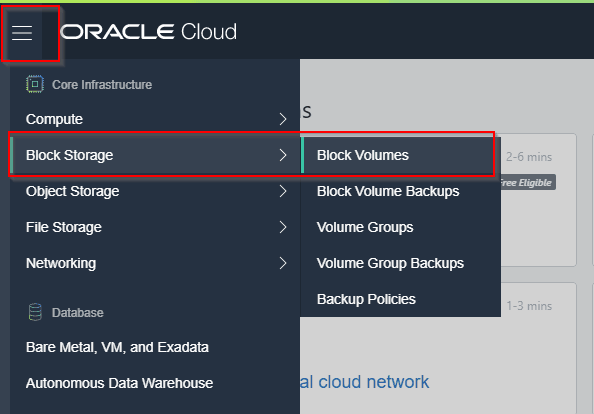
From the OCI console, we can get this feature for the new as well as the already existing Block volumes.


Comparison
The below table has all the details related to all 3 modes of Block Volume – Elastic performance.

To understand the relation between VPU, throughput and IOPS check the below graph which indicates that for Lower, there is no VPU involved and it is only for storage, Balance, and Higher performance.

On the Storage pricing, Oracle has added Block Volume Performance unit which is priced as
Performance Units Per GB/Month
- 0 VPUs at $0 for Lower Cost
- 10 VPUs at $0.017 for Balanced
- 20 VPUs at $0.034 for Higher Performance
As of now, OCI Block Volume Elastic Performance has 2 limitations:
- Only changes Block volumes elastic performance configuration on three volumes concurrently per tenancy.
- Boot volumes only have 2 options: Balanced or Higher performance.
This feature is definitely going to help the customer on the performance side and will save the costs as well. It’s easy to manage and can be controlled with Console, API, and CLI. Its dynamic nature makes it the best option.
Begin Your Cloud Journey
Begin your journey towards becoming an Oracle Certified Cloud Architect Associate by joining the FREE Masterclass on How To Become Oracle Certified Cloud Architect Associate in 8 Weeks.
Click on the image below to register for the FREE Masterclass NOW!
FREE Community
Click on the below image to join our FREE Telegram Group.

The post New Feature: How to Increase Performance of Block Volume appeared first on Oracle Trainings.